

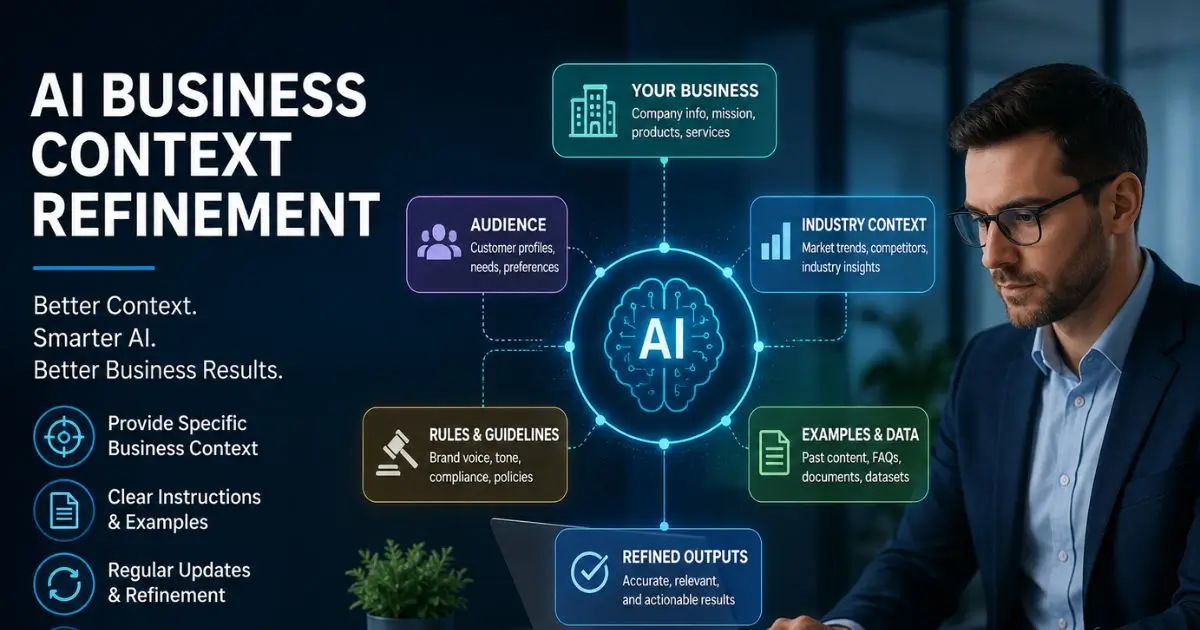
AI Business Context Refinement: A Practical Guide
You typed a detailed question into your AI tool. You expected a sharp, useful answer. Instead, you got something generic — the kind of response anyone could find with a quick Google search. Sound familiar?
This is the biggest frustration business teams face with AI right now. The tool is smart. The problem is that it does not know your business. It does not understand your customers, your industry rules, or the specific way your company talks about things.
AI business context refinement is the process of giving your AI tools the right background information, rules, and examples so they produce answers that actually fit your real work. Think of it like training a new employee. On day one, they know nothing about your company. By week four, they start making fewer mistakes because they finally understand the context.
In this guide, you will learn exactly what context refinement means, why most AI outputs fall short without it, and how to fix the problem with simple, practical steps you can use this week.
Quick Summary
AI tools give generic answers when they lack business-specific context. AI business context refinement means feeding your AI the right details — your industry terms, customer data, brand voice, and workflow rules — so it produces accurate, useful results. The process is not technical. It takes clear instructions, good examples, and regular updates.
What Exactly Is Context Refinement for AI?
Let us go a little deeper than the quick definition.
When you use an AI tool like ChatGPT, Claude, or a custom enterprise model, it starts with a massive amount of general knowledge. It knows a lot about everything but nothing specific about you. That is the gap.
Context refinement closes that gap. It means you deliberately shape the information the AI sees before and during each task. This includes your company’s tone of voice, your product details, your compliance rules, and even the way your team formats reports.
For example, if you run a dental clinic in Austin, Texas, and you ask an AI to “write a patient reminder email,” you will get a bland, generic message. But if you refine the context — telling the AI your clinic name, your friendly tone, your appointment cancellation policy, and your patient demographics — the output changes completely. It sounds like your clinic wrote it.
This is not about retraining the AI model from scratch. It is about giving better instructions and better background data. That distinction matters because it means any business can do this without hiring a machine learning engineer.
Why Most AI Outputs Miss the Mark in Business
Before we get into the “how,” it helps to understand the “why.” Why do AI tools produce disappointing results for business tasks?
Reason 1: No industry filter. The AI does not know that “lead” means something different in sales versus plumbing versus journalism. Without context, it guesses — and often guesses wrong.
Reason 2: No brand voice. Your company might use a casual, friendly tone. The AI defaults to a formal, corporate tone unless you tell it otherwise. The result feels off-brand.
Reason 3: No workflow awareness. Your team might need outputs in a specific format — a three-column table, a bulleted summary under 200 words, or a Slack-ready message. The AI does not know this unless you spell it out.
Reason 4: Stale or missing data. If your AI tool is not connected to your current product catalog, pricing sheet, or customer FAQs, it will pull from outdated or irrelevant information.
These problems are not AI failures. They are context failures. And that is good news because context is something you control.
How AI Business Context Refinement Actually Works
Here is a simple, step-by-step process you can follow. No coding required.
Step 1: Define Your Business Context Clearly
Write down the key facts your AI needs to know. This includes your industry, your target audience, your product or service details, your brand voice, and any rules or regulations you must follow.
Keep this document short — one to two pages is enough for most small and mid-size businesses. Think of it as a “cheat sheet” for your AI.
Step 2: Build a Prompt Library with Context Built In
Instead of typing a new prompt from scratch every time, create a set of reusable prompts that already include your business context.
For example, instead of asking “Write a product description,” your refined prompt might look like this:
“You are writing for [Company Name], a US-based SaaS company that sells project management software to small teams of 5–20 people. Our tone is friendly and direct. We avoid jargon. Write a 100-word product description for our new time-tracking feature, focusing on how it saves at least 3 hours per week.”
See the difference? The AI now has guardrails. It knows who you are, who your customer is, and what you care about.
Step 3: Feed Real Examples
AI learns patterns from examples faster than from instructions alone. If you want a specific email style, paste two or three of your best past emails into the prompt. If you want a specific report format, share a sample report.
This technique is sometimes called “few-shot prompting,” but you do not need to remember the technical term. Just remember: show, do not just tell.
Step 4: Set Output Rules
Be explicit about what you do not want. Tell the AI to avoid certain words, stay under a word count, use a specific structure, or skip disclaimers you do not need. Negative instructions are just as important as positive ones.
Step 5: Review and Refine Regularly
Context is not a one-time setup. Your products change. Your messaging evolves. Your compliance rules get updated. Review your AI context documents every few months and adjust them. This is where many teams fall behind — they set up context once and forget about it.
A Real-World Example
Let us look at a realistic scenario.
A mid-size logistics company based in Chicago uses AI to draft customer service responses. At first, the AI produces polite but useless replies. It tells customers to “check our website” instead of giving specific tracking steps. It uses formal language that does not match the company’s casual brand voice.
The operations manager spends one afternoon refining the context. She adds the company’s top 10 FAQ answers, its shipping policy details, its brand voice guide (friendly, no corporate jargon), and three examples of her best past email responses.
The result? The AI’s first-draft responses go from needing heavy edits to needing only minor tweaks. The customer service team saves roughly 45 minutes per agent per day. That is a real, measurable improvement from a few hours of context work.
Common Mistakes to Avoid
Even with good intentions, teams make these errors when working on AI business context refinement:
Mistake 1: Overloading the AI with information. Dumping your entire company wiki into a prompt does not help. It confuses the model. Be selective. Give only what is relevant to the specific task.
Mistake 2: Being too vague. Saying “use our brand voice” is not enough. Describe what that voice sounds like. Is it witty? Professional? Conversational? Give adjectives and examples.
Mistake 3: Ignoring compliance. If your business operates in healthcare, finance, or legal services, your AI outputs must follow strict rules. Build those rules into your context from day one. Do not treat compliance as an afterthought.
Mistake 4: Never testing the output. Always review what the AI produces, especially in the early weeks. Catch errors fast. Adjust your context based on what you see.
Before and After: What Context Refinement Changes
| Aspect | Without Context Refinement | With Context Refinement |
|---|---|---|
| Output accuracy | Generic, often off-target | Specific to your business and audience |
| Brand voice | Default corporate tone | Matches your actual brand style |
| Editing time | Heavy rewrites needed | Minor tweaks only |
| Compliance risk | High — AI may ignore rules | Lower — rules are built into prompts |
| Team adoption | Low — outputs feel useless | Higher — outputs feel helpful |
Tools and Methods You Can Use Today
You do not need expensive software to start. Here are practical options:
System prompts in ChatGPT or Claude. Both tools let you set “custom instructions” or “system prompts” that persist across conversations. Use this space to paste your core business context.
AI platforms with knowledge bases. Tools like Notion AI, Jasper, and Copy.ai let you upload documents that the AI references when generating content. Upload your brand guide, product sheets, and FAQ docs.
API-based solutions. If your team has a developer, you can use the OpenAI or Anthropic API to build custom workflows that automatically inject your business context into every AI request. This is more advanced but very powerful for larger teams.
Simple shared documents. Even a shared Google Doc with your team’s “AI context rules” can make a big difference. The key is consistency — everyone on the team should use the same baseline context.
Conclusion
AI is not going to magically understand your business on its own. It needs help. And the best help you can give it is clear, specific, well-organized context.
AI business context refinement is not a one-time project. It is an ongoing habit. Start small. Write a one-page brief. Build three good prompts. Test the results. Adjust. Over time, your AI tools will feel less like generic chatbots and more like reliable team members who actually know what they are talking about.
The businesses that get the most value from AI are not the ones with the biggest budgets. They are the ones that invest a little time in teaching their AI the right things. That is what context refinement is all about.
If you found this guide helpful, start by writing your own one-page AI context brief this week. Even a small step makes a noticeable difference in output quality.
About the Author
James Anderson is a senior SEO strategist and AI workflow consultant with over 10 years of experience helping US-based businesses improve their digital operations. He writes practical, jargon-free guides that focus on real results, not theory. When he is not testing AI tools, he is probably drinking too much coffee.
Note: AI tools and best practices evolve quickly. We recommend reviewing and updating this content every 6–12 months to keep it accurate and useful.
Bilkul, short version:
Frequently Asked Questions
What is AI business context refinement?
It means giving AI specific information about your business, audience, industry, and rules to get more accurate and relevant results.
How long does it take to set up?
A basic setup usually takes 1–3 hours. Larger businesses may need a few weeks.
Do I need technical skills?
No. Clear writing and organization are usually enough. Coding knowledge is not required.
How often should I update AI context?
Review it every 3–6 months and whenever your products, pricing, branding, or rules change.
Can it work with any AI tool?
Yes. Any AI tool that accepts text can benefit from better business context, though the setup may vary.